Analytics
Read clicks, leads, and attributed revenue across links, tags, referrers, and devices.
Analytics is the org-wide funnel: clicks on short links, leads once a visitor is identified, and revenue attributed to the first-touch link. Open it from the sidebar, from a link row’s click count, or from a link page’s Analytics card.
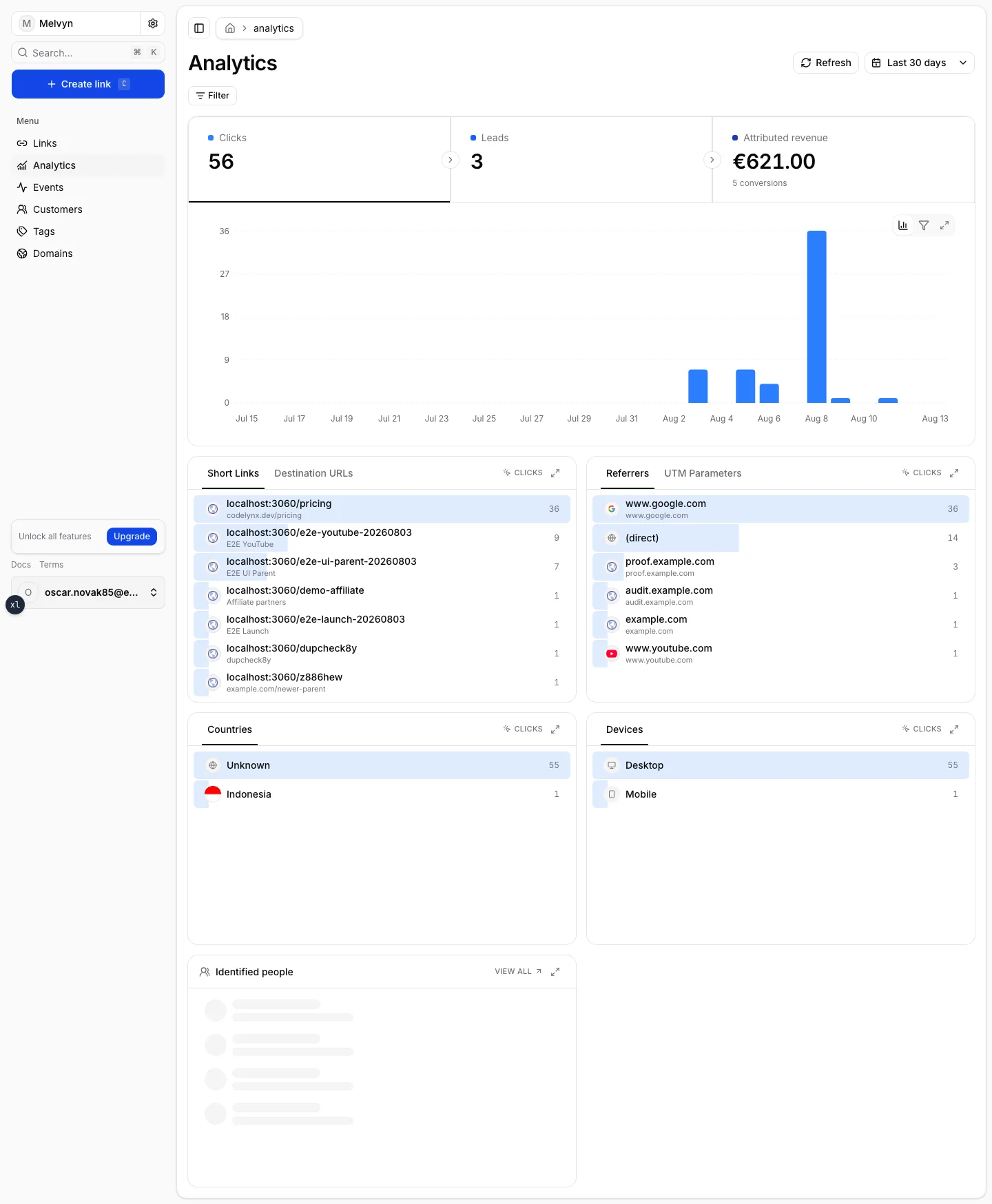
The three metrics
The tiles at the top pick the series the rest of the page follows. Click a tile to switch.
| Tile | Meaning |
|---|---|
| Clicks | Tracked opens of a Kliq short URL. Redirects continue after the monthly tracked-click allowance; detailed rows stop. |
| Leads | Identified customers in the period (kliq.lead or identify). |
| Attributed revenue | Conversions in minor currency units, credited to the first-touch link. When a result mixes currencies, the aggregate currency is null — Kliq does not invent an FX rate. |
The chart is the same metric over time. Daily / weekly / monthly buckets come from the selected period. Last hour, Last 24 hours, and Today read raw clicks in the window instead of daily aggregates.
Click a bar to narrow the date filter to the days that bar counted. Minute and hour bars stay inert because the URL only stores day bounds.
How the numbers are built
Live daily totals are computed from tracked clicks and events. Historical
snapshots imported from another platform (Dub, CSV) stay in a separate
imported bucket and must not be added onto a specific live day.
Dates are inclusive UTC days. Dashboard presets are Last hour, Last 24 hours, Today, Last 7 / 30 days, Last 3 months, Last 12 months, Month to date, Quarter to date, Year to date, All time, and a custom range. The HTTP API rejects ranges longer than 367 days; All time and a custom range on the dashboard are not capped that way.
Refresh re-reads bounds, totals, link options, and tags. It does not backfill missing ClickHouse rows.
Filters
One page, scoped by chips:
- Link — a parent. Breakdowns then include that parent’s sublinks.
- Link type — main links vs sublinks.
- Status — draft, active, archived.
- Tag — every link that currently carries that tag. See Tags.
- One click dimension — From URL (referrer), Destination URL,
UTM, Country, or Device. Daily aggregates store one row per
(link, day, dimension, value), so two dimensions at once have nothing to read. Picking a new dimension replaces the previous one.
Click a breakdown row to apply that filter; click it again to clear it. While a click-dimension filter is on, the other dimension cards explain they are unavailable rather than looking empty.
Breakdowns
- Short Links / Destination URLs
- Referrers / UTM Parameters —
(direct)means no referrer - Countries — missing geo shows as Unknown
- Devices
- Identified people — a preview of Customers, optionally scoped to the filtered link
Related
The same funnel, different grain:
- Events — the raw click / lead / sale / custom-event feed
- Customers — people, not buckets
- Attribution — why a lead credits one link
- Analytics API — the same totals over HTTP